What Jobs Should Rental Software Handle for Self-Managing Investors in Wisconsin?
Self-managing investors in Wisconsin typically need apps for specific jobs: collecting rent and tracking money, logging maintenance, and keeping property records. One software platform can cover several, so map jobs before comparing brands.
For self-managing property investors, picking the wrong software can lead to a host of problems. An investor may lose track of receipts, rent records can be confusing, and rental owners can easily end up paying for unused features. But sorting different apps by the job each one performs can help investors avoid common pitfalls.
Performance Asset Management (PAM) has used software to support property management in southeastern Wisconsin since 2012, when PAM became the first property management company in the state to collect rent digitally.
Since then, PAM founder Jim Miller has managed rentals on two major platforms: “We ran Propertyware. We’re in Rentvine—they’re great, but... they don’t drive the entire relationship,” he said. Point being, software supports a rental business, but people still run it.
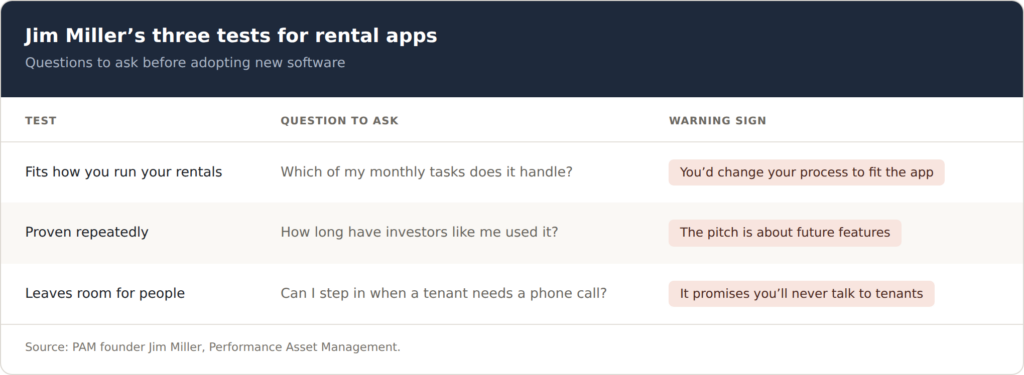
Before comparing brands, investors ready to use software should start by listing all the typical monthly tasks managing their property requires. That’s because federal tax compliance is a different task than organizing records for improving major systems. Keep reading to understand which features to look for to support rent collecting, accounting, and staying organized. Start with Jim’s three tests for deciding who and what to trust.
What Features Should Rent Collection and Accounting Software Have?
Rent collection and accounting software should accept electronic payments, show tenants a shared ledger, track expenses by property, and export year-end reports. Those features turn monthly rent into a financial record your accountant can work from.
“I’ve had lots of people tell me that they paid the rent when they didn’t,” said Jim. Electronic payments settle that question. For the DIY investors who haven’t started taking advantage of e-payments, accepting money electronically is a solid place to start acclimating to rental software for the following reasons:
- Automatic records: Each payment will have a date and amount on record, unlike cash, checks, and money orders that require logging
- Dispute settlement: Software minimizes rental dispute conversations because both sides get to view the same payment records
- Integrated system: Shared ledgers, property tracking features, and year-end reports can build on the payment record in one online system
Confirm the software tracks income and expenses separately for each property, as tracking tools can show which rental earns the most and which one is losing money.
“We use Rentvine. And then that captures the expenses. And then from there, we use different LLMs to analyze and isolate that data so we can separate it into CapEx, IncomeEx, Structural, and Variable,” said Jim. For more information on tracking expenses, read What Is Variable Expense Ratio and How Does It Affect Your NOI?
Use the software reports to help accountants distinguish routine repairs from larger projects that enhance or restore the property, as repairs and improvements are subject to different tax treatments, according to IRS Publication 527.
Year-end reports are another key resource, because they summarize income and expenses for each property, saving hours during tax season, while providing clear information to lenders. Check whether the software can prepare 1099s for contractors you pay during the year. If it can’t, the IRS offers IRIS, a free portal for filing 1099 forms.
Which Apps Help Investors Keep Organized Rental Property Records?
Document scanning, cloud storage, and calendar apps keep leases, receipts, inspection photos, and repair history searchable in one place. The IRS holds electronic records to the same standards as paper, so a legible scanned receipt can stand in for the original.
“I think the most important factor is having all the right information organized and readily available,” said Jim. Reliable data drives better decisions when something breaks.
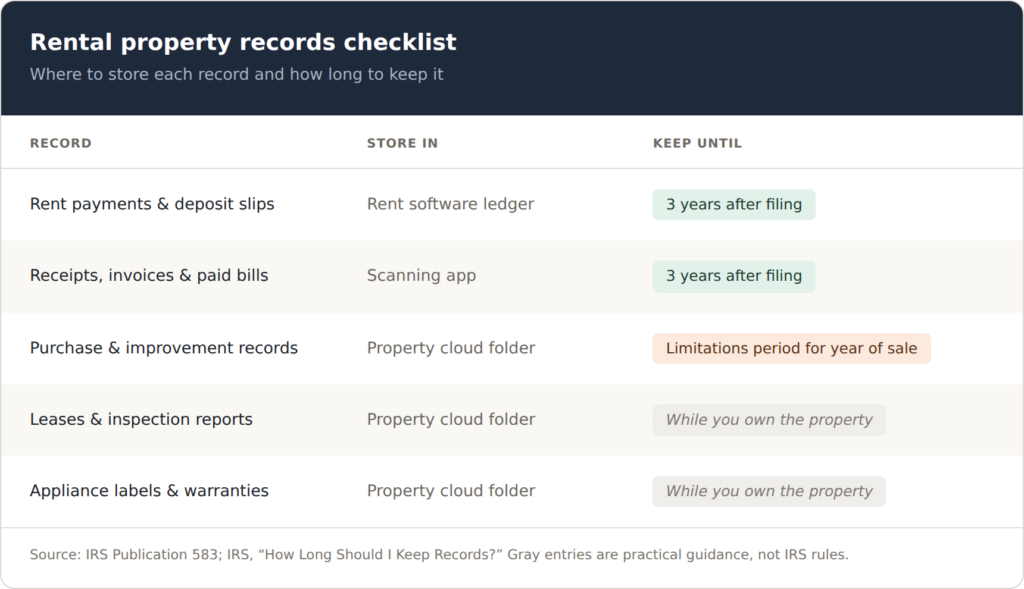
The IRS lists receipts, invoices, paid bills, deposit slips, and canceled checks as supporting tax documents, according to IRS Pub 583. A document scanning app lets investors avoid paper copies that fade, tear, or get misplaced. Invoices are accessible anytime via a smartphone.
Each property can have its own cloud folder for leases, inspections, warranties, and receipts. Naming files with the property's address and date improves their searchability. The alternative to scanned, legible documents is relying on original printouts and receipts, which is often risky.
Cloud storage can save photos of appliance labels showing model and serial numbers, along with installation dates. An investor can use an image to decide between repair and replacement, as well as document the condition of a unit at move-in and move-out, while calendar apps are useful for tracking dates such as filter changes, inspections, and lease expirations.
The general rule is to keep tax records for three years, but since property records follow a much longer timeline, the IRS advises investors to keep them until the limitations period expires for the year the property is sold. Saving those records can also help investors calculate gain or loss at a later date.
How Should Investors Decide Which Rental Apps to Trust?
Before adopting any app, PAM founder Jim Miller checks whether it fits core business principles, has a proven track record, and leaves room for human judgment. Investors should also weigh how much time it actually saves.
“Make sure that before you start chasing technological solutions, that particular solution aligns with your core business principles,” said Jim. To that end, investors can use PAM's approach to critique an app before adopting new software.
Confirm the app supports how the rental runs. For example, investors who collect rent on the first of every month should find an app that supports their process. Property owners who handle their own repairs or want per-property reports should seek software with features that save time and reduce headaches.
Look for results proven repeatedly. Success should be beyond a polished sales demo. Examine reviews from other investors with similar properties or portfolios. Ask how long the software has been on the market and implement it at one property before committing to a full rollout. “Always be shopping in the entire world, not just in our niche,” said Jim.
Stay available for when tenants need personalized support. Apps that automate routine tasks, such as sending payment reminders, storing receipts, and maintaining records, can be very useful. However, investors should be accessible or assign someone to communicate with tenants during delicate matters that need a phone call.
Manual operations are an alternative to rental software. Before PAM adopted digital resources, the team spent 90% of its time collecting rent, said Jim. Another approach is to get support from property managers with experience in southeastern Wisconsin. Speak with Jim for more, and learn how to free up time that could be reinvested back into assets that turn a profit.